

GPT Image 2.6 Character Consistency: Build a Reusable Reference
GPT Image 2.6 character consistency starts with a reusable reference and a clear distinction between what identifies the character and what changes in each scene. Approve the design first, create a small set of scenes from that reference, and compare the set before expanding it. Repeating a character's name in a prompt gives you less to check than a visible design and a short list of defining details.
You can develop a static character concept in the Image26 image workspace. This guide uses a fictional teal otter mascot to explain reference preparation, scene prompts, and approval checks. The prompts are suggested working instructions; the illustration is a concept aid, not a controlled consistency test.
What the model announcement establishes
OpenAI's Images 2.6 announcement describes improved preservation of character, product, and brand details during editing. That gives creators a reason to explore recurring-character work, but it does not guarantee that every separate scene will match.
The image-generation guide's limitations section still notes possible inconsistency for recurring characters across generations. Treat consistency as an acceptance requirement you inspect. A pleasing image can still fail the character brief.
For a three-image article series, your deliverable is three recognizable appearances of the same mascot. It is not simply three attractive otters with similar colors.
Approve one reference before planning the series
Start with a clear view of the whole character against a simple background. Keep the face, body, clothing, and distinguishing accessories visible. Save the approved image without overwriting it during later experiments.
For the fictional otter, write a compact identity brief:
| Keep fixed | What to record from the approved reference |
|---|---|
| Silhouette | Head-to-body proportions, rounded ears, short limbs, tail shape |
| Face | Cream muzzle shape, nose, eye spacing, cheek marks |
| Palette | Teal body, cream face and belly, amber scarf |
| Accessory | One scarf knot, its position, and the scarf's length |
| Rendering | Soft tactile illustration, rounded forms, gentle shading |
Replace these details with what your actual reference shows. Do not add hidden features by guessing. If the tail is never visible, either approve a separate view before using it prominently or keep the early scenes within the established view.
If your design is still unsettled, use Text-to-Image to explore it first. Once you approve a reference, switch to Image-to-Image for reference-based scene development. Review the available controls and displayed cost before generating. This workflow does not require a particular seed, character-lock switch, or training feature.
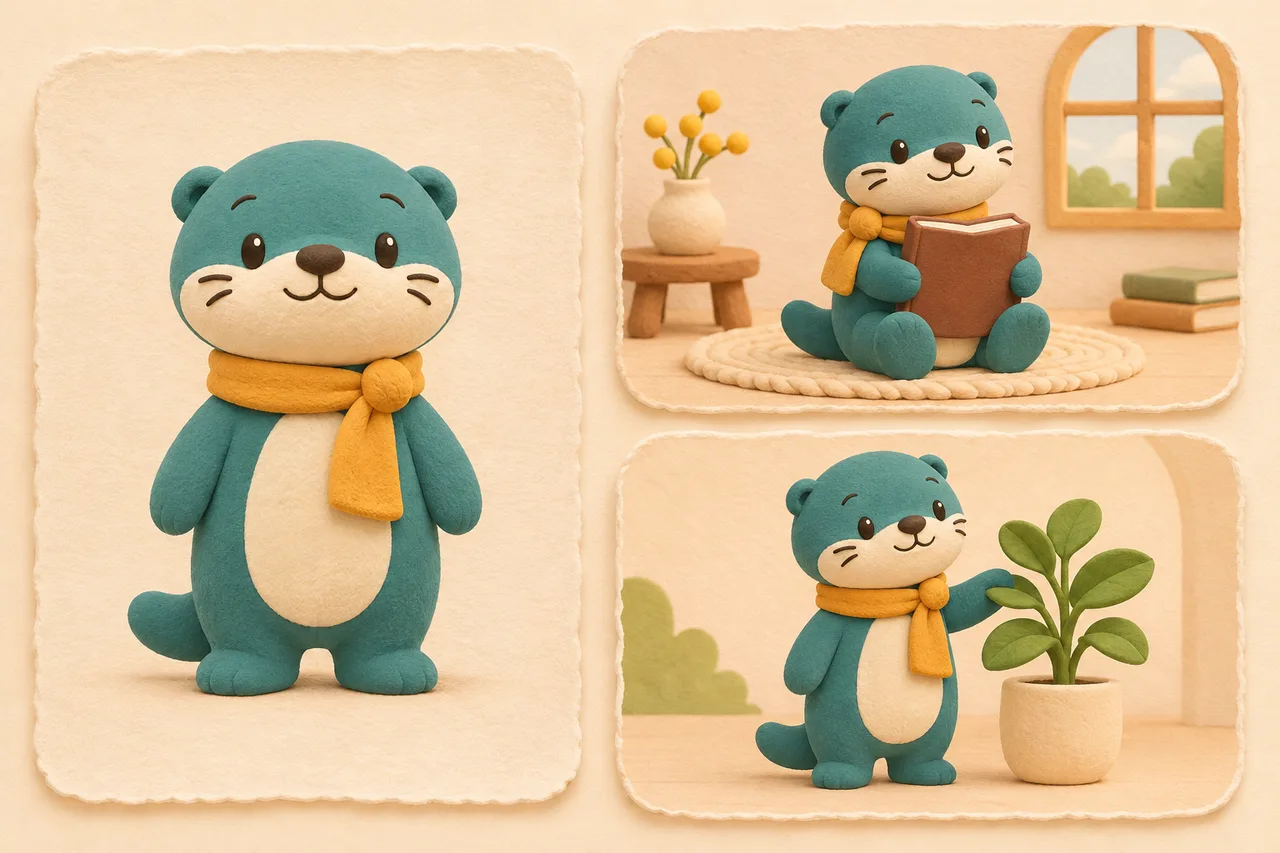
Original generated concept illustration of reference planning. It is not an Image26 screenshot or a set of GPT Image 2.6 test outputs. Use your own approved reference as the standard when judging a real series.
Separate identity instructions from the scene brief
Keep one reusable identity paragraph and change a short scene paragraph beneath it. This makes it easier to spot accidental design changes in the instructions themselves.
Here is an original example for an approved otter reference:
Use the uploaded otter image as the character reference. Preserve its head-to-body proportions, rounded ears, cream muzzle and belly, eye spacing, cheek marks, teal body, and amber scarf with the same knot position and length. Keep the soft tactile illustration style. Do not redesign the mascot or add clothing, accessories, lettering, or another character.
Scene: show the otter sitting on a plain rug, holding a closed, unlettered book. Use a calm cream background and gentle daylight. Keep the face unobstructed and show the scarf clearly. Compose one landscape illustration with room around the character.
For a second scene, replace only the scene paragraph:
Scene: show the otter standing beside a small potted plant, looking toward its leaves. Keep the full body visible, the background simple, and the lighting gentle. Leave room around the character. Add no book or other props.
These requests make the intended invariants explicit. They do not prove that the model will preserve them. Avoid asking for a new outfit, dramatic perspective, a different medium, and a complex action in the first comparison: each introduces another reason the character might look different.
Build a small scene set from the approved source
For each initial scene, return to the approved reference rather than using the most recent generated scene as the only input. Otherwise, an unnoticed change can become the next image's starting point.
Use a small pilot set with different demands:
- A simple standing pose, to check the silhouette.
- A seated pose with one prop, to check proportions and partial occlusion.
- A changed expression in a similar camera angle, to check the face.
This is a proposed review sequence, not a measured model benchmark. Generate and inspect one candidate before requesting a larger batch. Save the reference, prompt, selected model and settings, and candidate together. If you later change the approved design, give it a new version name and identify which scenes need revision.
A deliberately changed costume belongs in a new design variant. Keep that variant distinct from accidental drift so reviewers know what was intended.
Compare the set at two sizes
First place the reference and candidates side by side at similar character sizes. Check the face and silhouette before judging the scenery. Then inspect each candidate at the size where it will actually appear: a small card can hide a changed scarf knot while making an oversized head especially obvious.
Use pass, revise, or reject for each identity requirement. Avoid averaging the results into a general beauty score: a missing defining accessory can matter more than an appealing background.
| What changed | A focused next step |
|---|---|
| Eyes moved farther apart | Return to the approved reference and restate face proportions; simplify the expression |
| Scarf knot moved or became a bow | Describe the exact accessory and its position; remove competing costume instructions |
| Seated pose makes the body look like another character | Check limb and torso proportions against the reference; try a simpler pose |
| Texture shifted from clay-like to glossy plastic | Restate the rendering style and reduce conflicting material language |
| A prop hides the defining face details | Move or reduce the prop rather than approving an uncheckable image |
| Several features drift after repeated corrections | Restart from the approved source with a shorter brief |
Recheck the entire character after a correction. A fixed scarf does not establish that the face stayed the same. Where your workflow exposes location guidance, our visual editing guide explains how to combine it with written instructions.
Decide when generation has reached its useful limit
If the character must match exact approved artwork, keep that artwork as a separate layer and use conventional compositing or illustration tools for the scene. Reference-based generation is useful for exploration, but exact brand artwork may need controlled production.
Before delivery, keep the accepted reference, the final scene files, the prompts, and a short note explaining any intentional variations. Review the exported crop as well as the working image: a crop that removes the scarf can weaken recognition even when the underlying character is correct.
If motion is the next step, approve the static design before using the separate GIF generation workflow. Animation adds timing and frame-to-frame checks to the identity review.
Start with one character reference and one simple scene. Expand the set only after you can explain which details stayed consistent and which still need correction.
Documentation and Image26 controls checked November 11, 2026. Prepared by Image26 Editorial. No character-preservation rate, live generation benchmark, or guaranteed consistency result is claimed.